
RODE X Streamer X Audio Features Review
· Audio · Accessories · 11:33
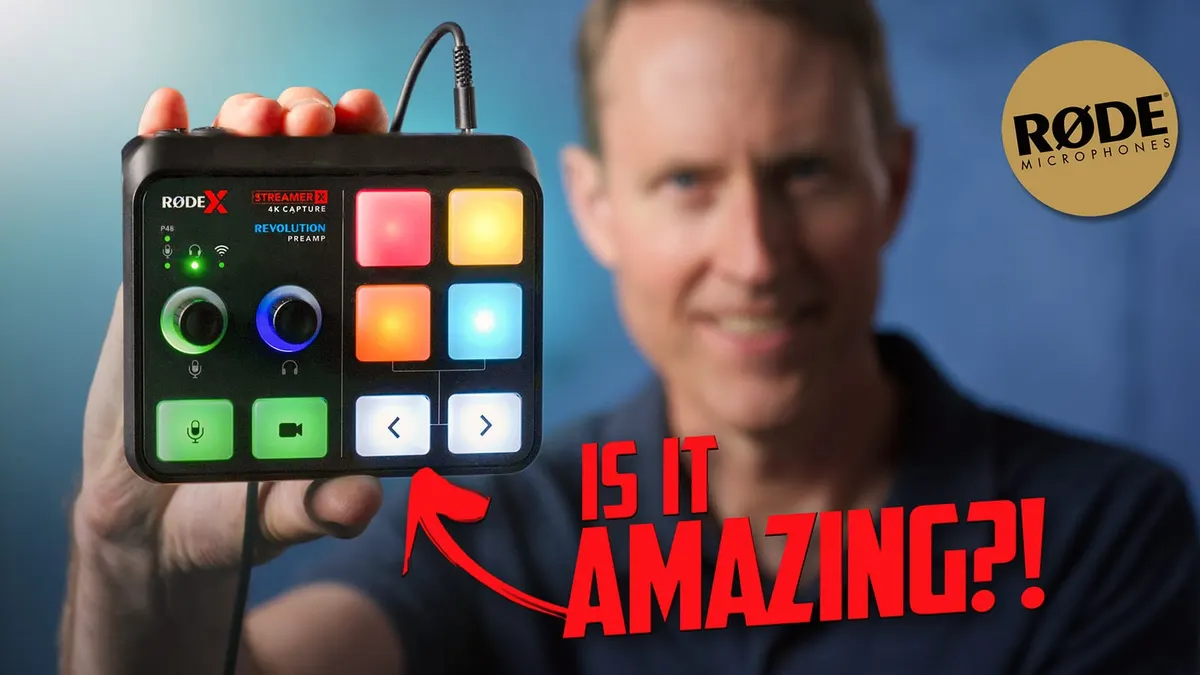
In this episode we take a detailed look at the highlights of the audio features available on RODE X’s Streamer X, and compare the quality of the Streamer X’s mic preamps to the preamps of two other popular podcast/livestream mixers. Then we recommend some recording tips and tricks that will help you make the most of these preamps’ high-quality sound.
Check out our recent livestream using the Streamer X right here:
• Sound for Video Session: Hardware vs …
Gear used or mentioned
The links below are Amazon, B&H Photo, Sweetwater, or other affiliate links. As an affiliate, I earn from qualifying purchases.
- RODEX Streamer X integrated audio interface and capture card — B&H, Amazon
- Mackie DLZ Creator Digital Mixer for Podcasting, Streaming, and YouTube — B&H, Sweetwater, Amazon
- RODECaster Pro II Podcast and Streaming Production Studio — B&H, Sweetwater, Amazon
- Earthworks Ethos XLR Broadcast microphone — B&H, Sweetwater, Amazon
- SHURE SM7B Cardioid Dynamic Microphone — B&H, Sweetwater, Amazon
- RODE NT1 5th Generation Large Diaphragm Condenser Studio Microphone — B&H, Sweetwater, Amazon
- Amaran 200x S LED light — B&H, Amazon, Aputure
- Aputure Light Dome II soft box — Aputure, B&H, Amazon
- Aputure Spotlight Mount — Aputure, B&H, DVE Store. Amazon
- Rosco Prismatic Glass Gobo in Cool Lavender — B&H
- Canon C70 Cinema Camera — B&H
- Canon RF 24-70 f/2.8 lens — B&H, Amazon
- Panasonic GH5 camera — B&H, Amazon
- Panasonic 12-35mm f/2.8 II lens — B&H, Amazon
Read the transcript
[Music]
In this episode we’ll take a look at the audio quality of the microphone XLR input on the RODEX Streamer X. What you’re hearing here is audio recorded into OBS using the Streamer X. I have one of my favorite microphones, the Earthworks Ethos, connected right here to the Streamer X. We also have a Canon C200 camera right there, also connected to the Streamer X, and it’s all being recorded in OBS. Now, in the Streamer X, we did set up some processing- kind of mild compression, just to kind of even things out a little bit, and a very light setting on the De-esser, and all the other processing in the Streamer X is turned off. So this is pretty much what you can expect this to sound like for your streams. Now, is the microphone, the XLR input on the Streamer X, good? Is it clean? Is it- does it sound good? Well, you’re hearing it now, so that’s the first thing. This is not a perfectly quiet room; sometimes the fan on that light comes on. The camera sometimes has a fan in it, but it’s pretty quiet. In any case, what we wanted to do is a slightly more scientific test. And so, let me just say this at the start: if you were worried that maybe the microphone preamp on the Streamer X- the XLR one, at least; we’re not looking at the headset version, because I don’t have a good headset- but this is what it sounds like. And I can just say, yes, it’s good. Don’t worry about it. It can drive microphones like a Shure SM7B without a problem.
You’re not going to need a Cloudlifter or a FetHead to give it additional gain. It has plenty of its own and it’s clean. So first we wanted to test the self noise of the preamplifier, the XLR preamplifier in the Streamer X. And the way we’re going to do that is use this dummy connector that has a 150 ohm resistor across pins two and three. Now, why do we do that? Let me explain. The reason we do that is it allows us to place the load on the preamplifier like a dynamic microphone would, like a Shure SM7B would, but without getting the audio from that microphone. So it’s important to do that when you’re testing the noise. If you just don’t plug anything into a preamp and crank the gain all the way up, you’re going to get a bunch of noise because it doesn’t have the load there that it’s normally expecting. So that’s why we use this dummy connector. Then we turned the gain on that input all the way up to 76, which is its max setting. So this is like worst case scenario here. We did the same thing on the RODECaster Pro 2 and on the Mackie DLZ, which is a- they’re both basically podcast live stream mixers. And they all performed really, really well. So what we found is that when we measured the overall audio levels, the noise levels in post, the Streamer X came out to -66.84 dB RMS max. If you don’t know what any of that means, normally I’m looking for that to be below 60 dB and this is well below that. So it did fantastic. You’re not going to have to worry about the preamplifier itself, making a bunch of hiss in your recording. There are other things you may need to worry about, but that’s not one. So I can fully endorse the Streamer X from that standpoint.
The RODECaster Pro 2, just out of curiosity, came in at -71.57 dB RMS max. So while the preamplifier design is generally the same, they don’t appear to be identical, but it’s not a problem. Again, the results on the Streamer X were excellent at -66. And then for the DLZ Creator, it came in at -70.44 dB RMS max. So in short, all of these performed really, really well. And the preamps are clean enough to drive a Shure SM7B with no problems whatsoever. This entire episode is recorded with this microphone. And again, we loudness normalized it to -23 so you can hear what it sounds like.
Now, if you’re trying to make your audio cleaner, the Streamer X is not going to get in your way.
It doesn’t have any issues with that. It also has a noise gate, by the way, so you can use that to help clean things up a little bit as well. A lot of times when we’re streaming, we’re working in a room with other- with computers that have fans in them, with lights that have fans in them, perhaps, or there’s air conditioning running; whatever the case may be. There is a noise gate to help with that a little bit. And those are the things you’re going to have to probably work on a little bit more. The Streamer X itself is not going to be creating the hiss and the noise. Another thing to consider is the microphone that you choose. If you’re using a dynamic microphone like the
Shure SM7B, it’s a very quiet microphone as well in terms of self-noise. So you’re not going to have to worry there. Some of the condenser mics can have noise floors that are a little bit higher. So this is not the cleanest mic in the world, the Ethos, but it works really, really nicely. It’s clean enough for sure. I’d also recommend if you want to get the best- the least amount of noise, work with your mic fairly close. Four inches, I think, is pretty much close to the ideal. That’s what I’m doing here. A lot- what that does in basic terms is it gets your voice close to the microphone. So you don’t have to gain up quite as much. And as a result of that, you’re not going to pick up quite as much of the room reflections like the sound bouncing off the walls, or any other things that are in the room making noise: HVAC, fans, things of that nature. So that’s probably one of the big things you can do. If possible, it is useful to put blankets over flat hard surfaces. If you can do that, I have, for example, sound blankets sitting on my desk here just to kind of make it so that we don’t get a lot of sound reflections off the desk itself. But whatever works for you, those things can always help. Now, great thing about the Streamer X is it has all the same processing that you find in the RODECaster Pro 2. So it has things like a compressor to even out your voice. It has a high pass filter, it has EQ, a de-esser, a noise gate, an aural exciter, and Big Bottom, which gives you kind of a bassy broadcast sound.
So it has everything you need. They seem to work identically to what’s in the RODECaster Pro 2. The controls are the same, you just use them on your computer as opposed to on the Streamer X itself.
The processing is actually being done in the Streamer X, but the controls are in an app called Unify that run on your computer. There’s a beta version on Mac right now. So I’m not going to fully review that right now. I think I want to wait until that’s out of beta at least. But the
Windows version is evidently done. And overall, what I can say, even with the beta version on Mac, it’s really pretty good. I’ll let other people, video people go into details on the HDMI input and how well that works. It can work up to 4K, 30p. It does have a 4K 60p pass through. So if you are game streaming, you can actually hook up a monitor and actually watch at 60 frames per second. So that all works good. But I think just in my kind of subjective opinion, here’s a live stream down here that we did with the Streamer X as our main streaming capture card and audio capture device.
And it worked really, really well for us. I like that there’s a big, easy to find mute button for your microphone. So you can very quickly mute and just to kind of demonstrate to see if there are any clicks when you mute, I’m going to go ahead and mute and then kind of bring it back in and… kind of caught me mid breath on the unmute there. But just to make sure I’m not hearing any…
I’m not hearing any clicks or anything with the mute button, which is a nice implementation. I have become very reliant on sound pads for when I live stream, I usually play intro and outro music.
And being able to have that with a big button, physical button that’s easily accessible and not some app, I have to go and try and get it to the top of my screen and start to play back for the outro music or the intro music; I really like having the pads and they work beautifully, you’ve got a bunch of different banks that you can use. And they’re not just playback pads, you can also use different effects. Here, for example, is the pitch shift effect. It’s a little bit hard to do this with a straight face. I also like that there are left and right buttons to quickly switch between banks. So they’ve really, I think, thought this through pretty nicely, you get four pads at any given time and you can then switch through multiple banks and seems to have plenty of storage. I don’t know- I think it’s two gigabytes, if I’m not mistaken, should be plenty for most cases. Now: the headphone amplifier. It’s okay, there is some hiss. And I noticed it especially on my Beyerdynamic DT 700 Pro X’s. And these are- these have 48 ohms as their impedance rating.
I didn’t expect quite this much hiss. So that was a little bit problematic. Interestingly, when I used a higher impedance set of headphones- 300 ohm Sennheiser 800 S’s- there was far less hiss and very nice clean signal. So I also turned the gain way down and plugged in the dummy XLR connector.
And I still heard some of that hiss. So it seems to be hiss that’s in the headphone amplifier and not in the preamplifier for the microphone. So that’s- that’s good. But it is a little annoying to have that hiss in there. Interestingly, it may be that it was designed for high impedance headphones, higher end over ear headphones for kind of premium streamers, but in any case thought
I should report that. Just like the RODECaster Pro 2, the headphone amplifier is not perfectly real time to me, it sounds like there is probably a sub 10 millisecond latency on it. I find that perfectly acceptable. I don’t find it distracting or problematic. But it’s not perfectly real time.
It’s not zero latency monitoring; there is, if I had to guess, it’s the same as the RODECaster Pro 2, which is six milliseconds. Most people can’t really- don’t really start getting disoriented unless there’s at least a 10 millisecond latency. So I think it’s probably going to be fine for most people. But for some that are very sensitive superhearers, could be problematic.
Now the free Unify app that comes from RODE, works with the Streamer X, allows you to configure the built in effects as well as route audio from all the sources you want to include in your stream, whether that be the mic, the game system audio, you can use a Wireless Go- little wireless microphone as well that will connect directly to the Streamer X, which is a really nice thing. And of course, you have the sound pads and effects, which are really nice as well. So all that setup can be done right from Unify and makes things nice and easy. And then what I do in OBS is I just bring Unify in as the source, and everything’s already combined and mixed the way I want it.
So overall, with the Streamer X, I’m pretty impressed. It’s a $400 device at the time of this review. I think it’s up to you as to whether it fits your needs. I don’t- I’m not of the opinion that there’s, like, an ultimate streaming device. And this could be the ultimate for some people, but just wanted to kind of outline some of the strengths and weaknesses as I saw them. I think the audio XLR input is fantastic. Haven’t tested the headset input- again, it’s not something I normally use. I don’t have a good headset to test with it. The headphone amplifier is okay, might work better with higher impedance headphones if you’ve got those. The video seems to work great.
Again, I didn’t go into great detail there. But overall, the Streamer X: nice device if you are the type of person that typically likes to work with OBS, for example, to do your live streaming.
It does a nice job with putting a capture card, an audio interface and sound playback and effects all in one convenient device. Get out there make some great sound. Talk to you again soon.